Friday, February 03, 2012

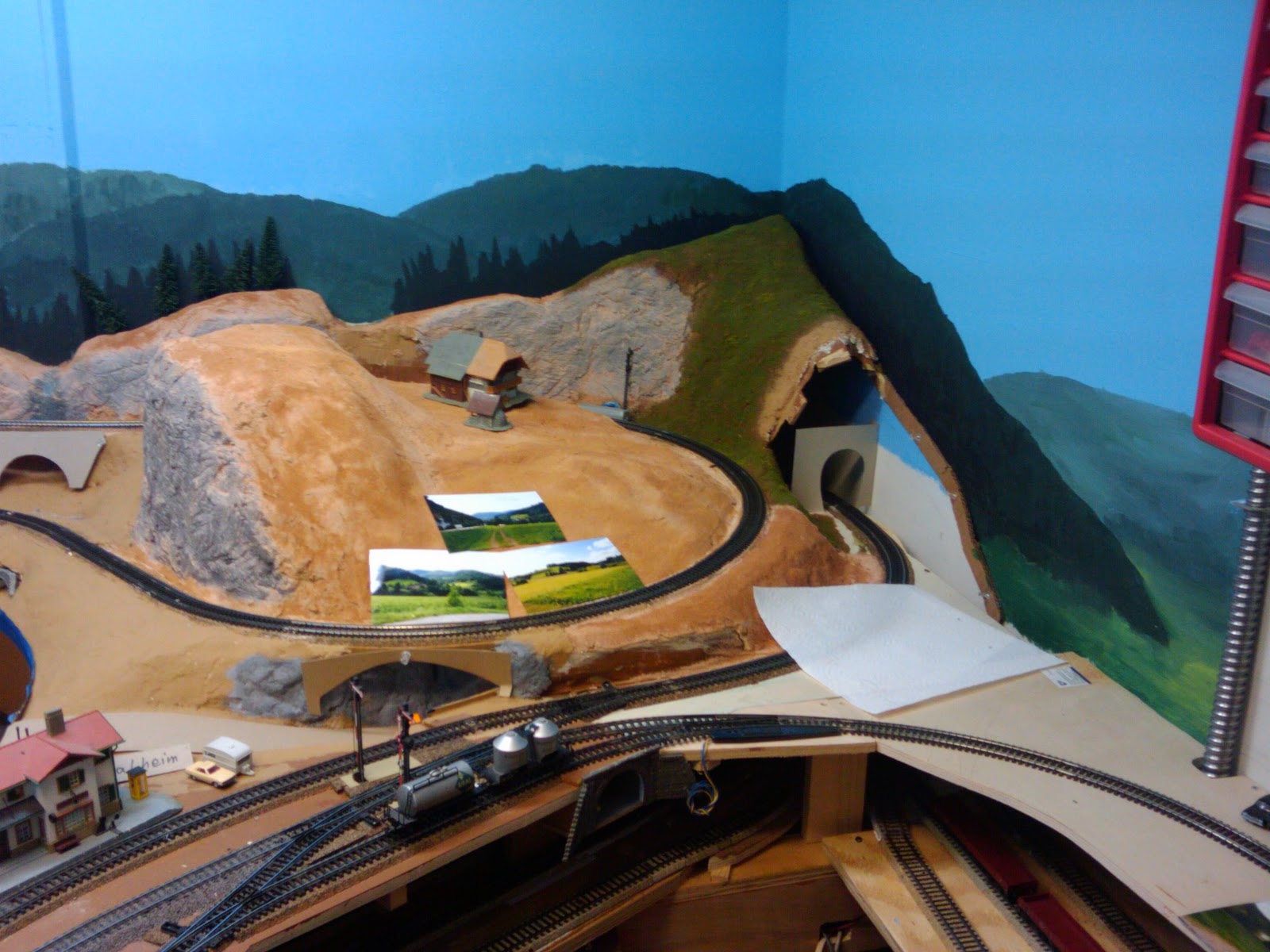
Emsingen Engine facility track connected...


I originally intended to use Flextrack to build the two tracks leading from the 3-way switch to the turntable. Which means, I wouldn't use the engine facility for quite a while. Last night I built a temporary connection from sectional track and for the first time ran an engine from Emsingen to the turntable and back. Things are starting to come together.

Monday, January 23, 2012

Emsingen town area

I've been building the support structure for the town of Emsingen over the last week. Since the town will sit on top of the ramps between the layout levels, I'm planning to make it at least partially removable. 


The brown area will house the Emsingen freight shed near the track. Depending on how space constraints work out, it will also support the lower parts of Emsingen, with the upper part of town (including the market square) sitting over the ramps in the corner. I simply used a 3/4" sheet of styrofoam (aka "Styropor") as the base, and cut it to the right shape. Messy as usual. I also reduced thickness a little bit around the freight shed area, so that the floors of cars on the track are at the same height as the loading dock. That said, the shed needs to connect to a small loading ramp that extends along the side of the track. The current arrangement is too diminutive. Maybe also scratch build an extension for the shed?

The "brown area" from below
The support framework will get in the way when cleaning track. I hope that by making the town removable, I can work on the town at the work bench in a somewhat comfortable seating position.

Boo-boo of the week
Oooops. Vertical clearance for the Prechtal staging track (center of photo) is 5 mm too low. That needs to get fixed.


Sunday, January 22, 2012

The top of a wall


After walking through Andy's Hobbys in Morgan Hill (not much train stuff there, but a good seletion for model car and plane enthusiasts), I picked up a piece of dimensional balsa wood that I figured might work well to top off the wall I added last year.


I managed to bend the balsa just enough to match the curve of the wall, and pinned it in place until the glue sets. I'll find out tomorrow if the glue will be strong enough to hold the piece in place. As it turns out the top is a bit on gracile side compared to the track ties. Oh well.

Eventually, I'll add a steel banister to prevent switch crews from falling off the wall.

Thursday, January 19, 2012

Town and Freight area supports


I'm about to fill in the empty corner in the back of the room shared by the freight shed, and the town of Emsingen. The bracing supporting the lower lying freight area and first row of houses is framed and glued in. I really need to get cooking on the layout of the actual town, and the detection sections in Hochwaldtunnel. While the town will be removable, access is starting to become tricky...

Thank you!


Got some nice wine from a co-worker today :-)

Sunday, January 15, 2012

Racing Fuel


Seen at a 76 gas station in Saratoga. Yes, that's $7.99 per gallon of Racing Fuel.

Thursday, January 12, 2012

View from the office


From the extended weather forecast, I knew the rain was coming. Yet it was at the same time exciting ("yay. Wind and rain, and I'm in the middle"), and depressing ("urgh. I'm cold and wet. Want to sit by the fire and sip some hot chocolate").

Wednesday, January 11, 2012

Books

Seen in the office library.


I love the combination of titles right next to each other.

Tuesday, January 10, 2012

Let it snow

Contrary to last time I was in Cambridge, MA, today we got a real dusting of snow.


Friday, January 06, 2012

Ohne Worte


At the station

As I was waiting for my train home today, a northbound express Caltrain raced through Mountain View's Castro Street station at high speed. Like this ...


... When it had passed there was a lot of excitement on the north-bound platform. A group of teenage girls with their luggage was discussing the experience:

"Oh my God, that was so cool!"
"Yeah, it was ... like ... it almost hit me."
"This was ... like ... so ... like ... soo cool!"
"Wow!"
"I was ... like ... standing here, and ... like ... the train was passing here. All that wind, and ... like ... noise. I've never had seen that before."


It's nice to see people ... like ... get excited about trains.

Tuesday, January 03, 2012

Sunday at Point Lobos


Definitely one of my favorite places along the coast...

Sunday, January 01, 2012

Hochwaldtunnel, part 2

Before I can permanently mount the "rocks" around Hochwaldtunnel, I need to build the actual tunnel tube.

Hochwaldtunnel portal
The tunnel portal is from Faller's premium series and made from foam. While the visual effect of the stone work is pretty good and it's easy to work with, overall I'm not particularly impressed by this tunnel portal. The foam is quite brittle, and I managed to break the portal near the crown stone. You can see the "fix" in the second photo below.

For the first part of the tunnel liner I'm using Noch granite wall stone paper. Yet another product I'm not impressed with, so I'm wasting it on the insides of tunnels. It has a nice stone structure embossed in the paper (contrary to some of the truly awful Faller stone papers), but the stone color is quite nasty, and to top it of, the sheet has a shiny finish (how lame is that?). When I paint the tunnel portal in the next step, I'll also paint the liner fading to black in the back. After the stone paper is plain old black construction paper, cut to fit. I like using construction paper inside tunnels since it has a flat finish, is reasonably sturdy, while still flexible enough to bend out of the way to gain access in emergencies. And of course, it nicely creates the "pitch black" look of a tunnel as demonstrated in my first tunnel built last summer.

side view
Since Hochwaldtunnel butts up against the room wall, the track inside is curved, and I need to be able to access the tunnel from underneath the layout, the tunnel "tube" is modelled only on the right hand side of the tunnel. The left hand side is open for access. Because of the room wall, one can't see the left hand tunnel wall. I will likely make it just a "curtain" of black construction paper once the tunnel is installed.

top view
The last photo from the top nicely shows the curved arrangement, and how the black construction paper acts as view block for folks attempting to look straight into the tunnel portal. I made the ribs supporting the paper tube from corrugated cardboard this time. The plywood ribs used last time are very sturdy, but the extra sturdiness wasn't really worth the additional effort compared to cardboard. I glued everything with Titebond II, a waterproof wood glue, that develops a good tack quickly, dries clear, and works very well with most porous materials.

Happy New Year


It's beautiful here. 
What will the new year bring?
Let's jump onboard and find out.

Hochwaldtunnel


First test arrangement of the painted tree bark. It looks quite OK on the right, but the pieces above the tunnel portal are too regular. I'll probably either break or replace the middle piece to get a bit more variety. The gaps between the pieces will be filled in with either Scuptamold or sculpting plaster. The top of both walls will be filled in with plaster and vegetation.

While the inside of the tunnel is pitch-black on the photo, it's not quite as dark in reality. A tunnel liner is in the works.


Saturday, December 31, 2011

Bluetooth micro keyboard for Grumpy


I picked up this micro keyboard on sale at Central Computers. It connects via Bluetooth to Grumpy, my MythTV box, and acts as a regular keyboard and mouse pad in both X Windows and the text console. It's functional, yet tiny. I wouldn't use it for programming, or email, but it's perfectlly sufficient for MythTV's keyboard shortcuts and or typing in a search box.

I'm using an Ambicom USB Bluetooth receiver, and the standard Linux Bluetooth stack. Adding the keyboard to Linux was trivially easy with the Gnome Bluetooth applet. The keyboard is found and recognized automatically. Aside from the Bluetooth pairing process no configuration was required.

Friday, December 30, 2011

Asus AT5IonT-I, MythTV, HDMI, Debian squeeze = no sound

Grumpy, my MythTV computer, is getting a hardware upgrade. I wanted a fanless motherboard with onboard graphics, which severely limited the choices. Eventually I settled on the Asus AT5IonT-I which comes with a dual-core Atom processor, NVidia ION2 graphics, Gigabit Ethernet, all digital video (DVI and HDMI), one PCI-E expansion slot.

I later found out that the Deluxe version of this motherboard has a DC 19V input, so could be powered with a common laptop power supply, and run completely fan-less. Oh well ... instead I found that this is the first motherboard in the house that has a 24pin ATX12V power socket. While the socket accepts the traditional 20pin ATX plug, I opted for a new power supply with a temperature controlled fan (Antec Basiq 350W). The setup runs *very* quietly, especially compared to the previous setup.

Since one of the Seagate replacement drives showed up recently, I could build the new system without having to take apart the existing system. The install with Debian Squeeze worked reasonably well, with the only hiccup being my indecision on what I wanted the file system layout to be, and the need for building the RAID array with a missing drive. The AT5IonT-I comes with a RealTek GigE network adapter, which needs non-free firmware. One needs to jump through a few hoops to get the firmware file in place during the network-based install.

Migrating MythTV was surprisingly easy. I mostly followed the instructions from the MythTV site, and eventually moved one drive from the old system to the new system. After a few hours of copying, the files were on the new disk, and I could add the old disk to the RAID on the new system.

So far, so good.

Then the trouble began. The usual dance debian-style to add the non-free NVidia drivers quickly produced a decent desktop picture. I adjusted the resolution to 1360x768 instead of the default 1280x720 reported by my Sharp TV. Oh, did I mention that this motherboard has a HDMI connector? Sounds great. Though, there wasn't any sound. An extended excursion into the depths of ALSA, HDA, and HDMI sounds on Linux followed. What a mess.

aplay -l consistently did not show the NVidia sound card with HDMI. alsamixer always told me that "This card has no controls", so there was no SPDIF output to unmute.  Debian Squeeze comes with alsa 1.0.23, and a NVidia 195.x driver for kernel 2.6.34. Combine this with the setup of the AT5IonT-I  which has both an Intel HDA sound, and NVidia HDA HDMI sound built-in, and I could not get HDMI sound working, no matter what probe settings I chose, manually loading kernel modules, etc.

Eventually, I relented and upgraded the machine to Debian Wheezy (i.e. testing). It comes with alsa 1.0.24, NVidia 290.x and kernel 3.1.0. The usual apt-get dist-upgrade dance took place, which included a fun Perl dependency during the uninstall of libwmf0.2-7 failing on File::Copy (hence aborting the dist-upgrade leaving the packages in an inconsistent state) because we got a partially updated Perl 5.14 module set.

However, once that was all set and done, setting NVidia HDA HDMI as the default sound card in the Gnome Audio Settings, and adjusting the MythTV settings, I got crystal-clear sound. I also set MythTV to use VDPAU for hardware-accelerated video-playback, which substantially improved the video quality of 720p and higher recordings.

All of this would have been A LOT easier had I trusted my gut and installed Wheezy from the start.

A side-note on GNOME3:
What have they done to this previously really usable window manager? It's not quite as annoying as Ubuntu's Unity, but the default GNOME3 is merely pretty and looks good. Once one tries to use it, workflows that used to take one mouse click and a drag, now require at least 3-5 mouse clicks on different parts of the screen.
I can SEARCH for an app by TYPING its name in a search box. How brain-dead is that for a desktop environment?
It appears that the developers took all the ideas of MacOS and Windows (the ones that make you move the mouse a lot), picked the worst of both worlds and combined them into GNOME3.

Regular GNOME3 also interacts badly with the menues in MythTV frontend.

GNOME3 Classic with the regular menu structure is usable, and works fine with MythTV frontend, though if I encounter any more issues, I'm switching to another window manager.

If it weren't for MythVideo, I'd run MythTV frontend without any window manager...

---


After all this trouble Grumpy really deserves its name now. While this whole exercise took almost 3 days of elapsed time, it was a learning experience, so at least I got something out of it.

Thursday, December 29, 2011

Freight Depot

While gathering all the pieces I need to rebuild a computer for the train room, I also made progress on other work items on my list.

The freight shed for Emsingen is almost done.
Gueterschuppen (office side)
Gueterschuppen (street side)
Visually, I like the office side of the freight shed a lot better than the rear side. Since the track serving the freight shed is to the right of the station building, I'll likely arrange the shed so that the office faces the the station. The drawback with that arrangement is that there's only the short covered loading ramp facing the track. And the office is in the way of loading doors, too. Oh well, when there's ground to put the shed on I'll try out what works best and go from there. I need to add the lights for the loading ramps, as well as a little lamp above the office door, and I'm still toying with the idea to add actual office furniture inside, but only if it'll be visible from the Emsingen operating pit, so that will have to wait a while until I make up my mind. The shed is painted and lightly weathered. I especially like the effect of the corrugated roof.

Hochwaldtunnel with bark "rocks"
Years ago I read about a method to make "rock walls" from tree bark. Pascal and I tried that out yesterday, and while the color of the rocks came out a bit too dark, the result is definitely workable. 

Hence the "Hochwald project" was born:
Before going back to work on Jan 3rd, the plan is to finish the rock cuts around the Hochwald tunnel entrance, the tunnel portal, as well as the trees and deco in the Hochwald corner of the layout. 

The semaphore in the photo is the north entrance signal to Talheim, but won't stay here. Instead I'll allow switching moves all the way to the tunnel portal and add a "Halt fuer Rangierfahrten" sign to the tunnel portal. This matches the detection sections I already set up, and makes explaining the Talheim switching limits a lot simpler. Even though, after I added Kopper furniture and related switches in Talheim, most operators don't use this section of track for their switching moves anymore at all.

The Talheim entrance signal will be imagined to be on the "other side" of Hochwaldtunnel and be represented on a signaling board mounted to the back wall, whose LEDs will be controlled by the SIC24D that drives the Emsingen panel. That signaling board will eventually also display track occupancy of the long tunnel track between Emsingen and Talheim.

The semaphore will become the south entrance signal of Emsingen.

Saturday, December 24, 2011

Friday, December 23, 2011

Oooops!


I think, I need to buy more Christmas lights...

Wednesday, December 21, 2011

Vacation has begun ...

... and I don't need to feel guilty for staying up late to work on models.


This is the well-known Faller "Gueterbahnhof", a model that has been around forever. I decided to try a couple different techniques with this building to get back in the swing of building plastic models. Out of the box the model is way too colorful for my taste. Red brick walls, green wood rafters, gray paneling, brown window frames, ...
The walls don't look like bricks to me at all, but are sized more like cement blocks, so I painted the walls Aged Cement gray. For the rafters I used Leather brown. The window frames are painted in a thin coat of Rust. The outside flooring is painted in Cement, the inside flooring CSX Gray (PollyScale colors).
I don't have a nice green tone for the doors at hand, so I left them alone.  The outside walls were treated with a light wash of black India Ink in Isopropyl alcohol. Once I'm completely done with the building, and weathering, I'll seal everything with Dullcote, which will also remove the plastic sheen from the freight doors.
I'm planning to add some freight boxes on the loading dock, and inside the building, so I touched up the inside walls with dirty White. This building will probably be tricked out with four to five grain of rice miniature filament lamps (one each above the loading docks, one in the office, one above the office door, possibly one in the loading area). The lamps will need to be dimmed a bit, so that they last longer, and the light doesn't shine through the thin plastic walls. I might try to add some office "furniture", too ...

Sunday, December 18, 2011

Switching with a control stand throttle


This is very cool.
Makes very effective use of slow decoder deceleration, and NCE's brake functionality.

Friday, December 16, 2011

Wednesday, December 14, 2011

Seagate's 2TB SATA drives

A year ago I added two 2TB SATA drives made by Seagate to grumpy, my MythTV machine, and set them up as a RAID1. I got the Barracuda Green 5900rpm drives at a quite decent price.

The trouble started within weeks. The ominous "Seagate click". Study of various articles led to the conclusion that in this drive family this is some harmless recalibration during times when the disk has been idle for a while. Not  the well-known "click of death", when the disk heads can't read the servo information on the platters any more. Aside from a firmware upgrade (which more or less just makes this calibration less audible), one could prevent the click by making sure there's at least one disk access every 30 seconds or so. 

Anyways, that was dealt with. A year later, in late October,  one of the two disks got thrown out of the RAID array due to failure to read a sector. Since this is a giant data volume with lots of movies and videos, I got a replacement drive at a local store (at a higher price than I paid last year, thanks to the flodds in Thailand), installed it and resynced the RAID. Good.

I sent the disk to Seagate for warranty replacement. A refurbished drive arrived promptly a few weeks later. On Monday the replacement drive I bought new in October got thrown out of the array with a bad sector. I ran a SMART self-test, and sure enough, the self-test reports unreadable sectors. 

Not a problem, I still have that replacement drive in the closet, install that, re-sync the mirror over night, go to bed, and ... the sync didn't even complete before the drive got thrown out of the array with read errors. In the morning, I left the drive in the machine, and went to work with a plan to take a closer look in the evening. Just after dinner, there it was, ... the "click of death". The replacement drive didn't last even 24 hours.

So, now I have two bad drives that are going back to Seagate tomorrow, and a replacement Green drive from Western Digital should show up by Friday. 

Sometimes I hate technology.

Monday, December 12, 2011

Saturday, December 10, 2011

Found it!

After quite a bit of searching I finally found the short circuit in the Emsingen power district.

It's here:


Can't see it? Here's another view:


Still can't see it? How about in this photo?
 

Yep.
I screwed up when I installed the track 9 months ago and didn't pay proper attention to the connecting latches between these two switches. One latch was bent so that it touched the rail when the neighboring switch was pushed down onto the track bed.
This only became a problem a couple weeks ago when I glued down the last track in Emsingen's freight area. I don't glue switches to the roadbed since they have moving parts underneath, so when the loose track seen in the first photo was glued down it pushed down the switch, which pushed down the rail, and made it touch the bent latch.
Ripping out the newly installed track didn't help, because the ends of the switch where tacked down during installation and got some glue, too, so the switch stayed in position. I'm actually glad it stayed put, since a persistent problem is a hell of a lot easier to debug ...


Using the continuity tester in my ampmeter and following the resistance readings, I was able to reduce the problem to the general area of the north switches in Emsingen.

I found the bad latch only after I clamped the leads to the rails and pressed on tracks and switches, as well as lifted them from the roadbed where possible until the beeping stopped.

At that point I could control the beeper by pressing on the joint, and I knew I had a winner.

Fixing it required some gentle force with a screwdriver to bend the latch out of the way.

Total Eclipse of the Moon in San Jose

This morning I got up a bit early, and took Pascal and Tatjana to see the total eclipse of the moon from the eastern foothills. The picture is a tad shaky (even though I used a tripod), and the camera / lens is not taking this well, but as can be seen in the picture ... the moon is indeed red.


A little bit later we drove over to Santa Teresa County Park, to see if I could get a better shot. Unfortunately by the time we got there the moon was so dark and low above the horizon that it no longer was visible.

However, the sunrise was quite nice.


Time to go home and have breakfast...

Friday, December 02, 2011

Sunday, November 27, 2011

"I'd like to watch some TV ..."

"... could you please bring my phone?"

The wonders of Mythmote.

Friday, November 25, 2011

When something goes wrong ...

... it usually happens in more than one place at a time.

The laptop I use as train computer developed a memory problem. The BIOS disables any memory above 88M due to a failure during POST. Yes, that laptop was quite slow, but it did the job, and has a beautiful, huge 1900x1600 display. Evaluating my options:

  1. I can go out and buy a cheap desktop computer, put it in the server rack, and run VGA/keyboard through the KVM to the 15" monitor at the rack. That would likely work out to be a DualCore or low-end i3.
  2. Ditto, but get just a low-end, low-power motherboard, and memory. One of the current pseudo-embedded CPUs, or Atoms, should do just fine. Install it in a spare computer case and put it into the rack.
  3. Try and make do with the 88M memory, convert the laptop to a dumb X-Terminal, (potentially remote boot it), and run JMRI on the server with a remote X session to the laptop. Technically a bit more interesting, a bit more involved, and actually not really something I'm particularly keen on. I get enough overly complicated setups at work.
I think I'm going to throw hardware at the problem, and go with either option 1. or option 2. and give up on the nice display.

---

The Emsingen power district of the layout developed a short circuit some time in the last 48 hours and I have no idea what caused this. The PSX circuit breaker is solidly reporting a short. All 3 PSX's LEDs flicker roughly  every 2-3 seconds, and the amp-meter shows an inrush of current at the same time. Evaluating my options:
  1. When I installed semaphores yesterday, something got on the track and is causing a short. I brushed down all tracks in Emsingen. No dice.
  2. Maybe a locomotive has a shorted out decoder, or some car is derailed. Removed all rolling stock from Emsingen. No dice.
  3. When I cut and glued down the north stub track next to the loading ramp on Wednesday, I somehow caused a short. Unlikely, but I ripped out this piece of flextrack anyways. No dice... Now that's annoying.
  4. I somehow jumbled track wires underneath Emsingen. No idea how that even could have happened. Did a visual check, and all connections look good.
  5. Powered off everything. Maybe the PSX just got confused. Nope, problem still there.
  6. Maybe the PSX is bad. Put the district on another PSX for testing. Still to do.
---

Patricia's computer developed an interesting file system problem. It appears that when the system stats some inode linked from her home directory, the operation hangs forever. This causes process like Nautilus or ls to go into state D+. I can kill -9 the process from another terminal, and get back the prompt. I can do tab completion (e.g. type ls .[TAB] and get a list of all files starting with '.'). I haven't tried every character yet. There are no hard disk related errors in dmesg. smartctl reports the hard disk recorded no internal errors either. I'm suspecting ext4 file system corruption, and will try an fsck next.

---

Bottom-line: What the hell is going on today?

Tuesday, November 22, 2011

Wireless stopped working ...

Out of the blue, wireless networking stopped working on our Dell Inspiron 1440. It runs Ubuntu 10.04 LTS, and no system update was performed before things stopped working. The Network Manager menu in Gnome shows Wireless Network Disabled, and Wired Network as Disconnected. Meanwhile other laptops in the house have no problem connecting to the wireless network, so this must be something local to this laptop.

In digging through Network Manager, iwconfig, iwlist, wpa_supplicant and friends, all I could come up with was that /var/lib/NetworkManager/NetworkManager.state lists WirelessEnabled=False. Manually setting this to True and restarting NetworkManager gets us plenty of log messages that show the device exists, and then gets disabled.

Finally, I realized that someone must have pressed the Disable Wireless button on the keyboard. Pressing it again resolved the problem. Sometimes it's the simple things ...

Monday, November 14, 2011

Mickey's Fantasmic! vs. World of Colors

Over the weekend I had the pleasure of watching both the "World of Color" show at Disney's California Adventure, and "Mickey's Fantasmic!" show at Disneyland back to back.

Both shows are very well attended outdoor evening shows, so getting there early (and getting the Fastpass for World of Color) is highly recommended. Both shows are good and fun to watch.

What struck me more, though, were the differences both in style and execution.

World of Color - California Adventure
Let's start with "World of Color". This show transforms the big lagoon at California adventure into a colorful spectacle of water fountains, mixed with movie scenes projected on screens made out of water. The execution was flawless. The color effects are mesmerizing. The fountains fantastic. However, to me it felt like this show was "built by committee".

World of Color - Movie projected on water fountain
The show started off with a season appropriate opener involving a Christmas theme. The fountains were colorful and impressive. From then on short sequences from well-known animated movies, old and new, played back to back with fountain sequences. Some sequences where upbeat, funny, others a bit scary, or dark. I'm still scratching my head why a segment from "Pirates of the Caribbean, On Stranger Tides" was included. The mermaids in the segment are really not Ariel-style family fare... At the end of the show I was both impressed and disappointed. The technical part of it was fantastic, but the whole thing lacked ... heart.

Mickey's Fantasmic!
After a mad dash from California Adventure we made it just in time to Disneyland's Rivers of America for "Mickey's Fantasmic!" . This show also uses water screens for movie sequences, but uses the Pirate's Lair island as a very effective stage for Mickey directing lights, fireworks, and fountains, as well as acting as background for the witch's magic potion scene and even a full-size dragon.

Mickey and the Dragon

Some movie scenes mix with live action of dancing princesses, Peter Pan fighting Captain Hook with the crocodile on their tail... and generally, compared to World of Color, less computer-controlled, more hand-made action. Even though (maybe because) Fantasmic! was a bit less polished, to me it had a lot more charme.


Bottom-line: Try to see both shows, especially when you're in the parks more than one day. Watching the shows back to back is probably only feasible during a slow week outside the summer months, because the viewing areas fill up quickly. Even last week, on a somewhat rainy day, many people got there over an hour before the show started to reserve good spots.

Oh yeah, it's very hard to take any halfway decent pictures of either show...

Sunday, November 06, 2011

Is that going to work?

On the workbench
Building a Timesaver in N scale is a little side-project. Above is the result of one long evening. The track is cut, and partially glued down. Let's see how this develops further ...

Saturday, October 29, 2011

Kalmbach Books now available in digital formats


Here's another publisher who is having a hard time adjusting to the digital age: Kalmbach, the publisher of the venerable Model Railroader magazine. I'm a subscriber of Model Railroader, and looking at inserts and ads in each issue, it's very obvious that Kalmbach is very good at recycling content from articles in different forms and trying to milk their customers any way they possibly can.

Recent example: The Model Railroader 75 year DVD set ... at a cost of $195. The biggest value here is being able to look up a certain article from a few years ago, but at almost $200 that's really not worth it. miba (the german equivalent to Model Railroader) is selling their 60 year collection on DVDs for 60 Euros, ie. at a cost equivalent to 4 digital yearly editions of miba on CD.

Another example: Kalmbach Books is releasing popular books in digital format by partnering with Zinio.  Take "Basic Model Railroading", an introductionary book to model railroading. Zinio charges $17.95, the exact same price as the recommended retail cost of the paperback version. Sounds fair?
Not really, no-one sells the paperback at retail price. It's on Amazon for about $10-12, and can be found new for as low as $5. While there's certainly some value to be able to carry around your railroad literature on a memory stick, is it worthy to pay more than street price? No, thank you.

And oddly ... I still prefer paper over pixels.

Friday, October 28, 2011

At night


I like this shot of the signals south of Blossom Hill in the headlights of an approaching train. I should come back with a decent camera and try to do this right. A cell phone camera in the end is still a cell phone camera...

The answer


Tuesday, October 25, 2011

Nothing new

Yep, there's not much going on right now with the layout. The "busy season" has started, and on top of that a lot of things are happening at work. That doesn't leave much time for modeling, building stuff or even running trains. I don't expect to get much work done on the layout until at least Thanksgiving.

However, I'm getting my fair share of running trains over the next week: SVL has the last ops session of the year on Friday, and I'm invited to an ops session at a local layout next Tuesday. Both should be fun, though likely quite different in how they pan out.
The following Saturday, November 5th, 12 noon to 5pm is Open House at SVL.


Monday, October 17, 2011

The Schedule

I designed the passenger schedule for the Welztalbahn around a few constraints.
  • The schedule would need to make sense in the real world. My operators most likely don't really care about this, since they are busy with getting trains and cars to where they are supposed to go, but I notice and that's what counts. 
  • Provide for some operational interest. I.e. make life a little bit harder for operators by setting up meets and having to think about train priorities and direction through Talheim interlocking.
  • Get in the way of freight trains and switching. 
Emsingen is the hub of activity on the layout, closely followed by the interlocking in Talheim. Above constraints led to the following principles:
  • Passenger traffic flows mostly between the big cities "surrounding" the layout area, as well as commuter service to Freiburg. 
  • Emsingen is "Eilzugstop" (i.e. the faster passenger trains stop only in Emsingen). 
  • Trains arriving from Prechtal via the (imagined) branch line either terminate in Emsingen, or continue on to Freiburg.
  • North-bound passenger trains to Prechtal can meet a south-bound Eilzug to Freiburg in Emsingen.
  • South-bound passenger trains from Prechtal can meet a north-bound Eilzug from Freiburg in Emsingen.
That yielded the following sequence of events:
PT = Prechtal, FR = Freiburg, ST = Stuttgart, TB = Tuebingen,  EM = Emsingen, TH = Talheim
(S) = running south-bound, (N) = running north-bound
  • EM switching
  • PT -> P 8114 (S) meet E 3577 (N) at Emsingen -> FR
  • FR -> E 3577 (N) meet P 8114 (S) at Emsingen -> ST
  • Ng 83271 (N) prep
  • Dg (S)
  • Ng 83721 (N)
  • ST -> E 3576 (S) -> FR
  • FR -> P 8115 (N) -> PT
  • Dg (N)
  • PT -> P 8116 (S) meet E 3555 (N) at Emsingen -> FR
  • FR -> E 3555 (N) meet P 8116 (S) at Emsingen -> TB
  • Ng 83720 (S) prep
  • Ng 83720 (S)
  • FR -> P 8117 (N) -> PT
  • TB -> E 3554 (S) -> FR
  • EM -> Ueb 97 836 (S) -> TH (Switching)
  • PT -> P 8118 (S) meet E 3579 (N) at Emsingen -> FR
  • FR -> E 3579 (S) meet P 8118 (S) at Emsingen -> ST
  • ST -> E 3578 (S) -> FR
  • FR -> P 8119 (N) -> PT
  • Dg (S)
  • PT -> P 8120 (S) meet E 3557 (N) at Emsingen -> FR
  • FR -> E 3557 (N) meet P 8120 (S) at Emsingen -> TB
  • TH -> Ueb 97 836 (N) -> EM
  • EM switching
There are still several flaws (e.g. meets in Emsingen are always the same direction, and there are no returning trains from Tuebingen), but I liked how the schedule left room for switching moves, and allowed for ebb and flow of traffic.

Saturday, October 15, 2011

Third Ops Session at the Welztalbahn

Today marked the first time the Welztalbahn saw an operating session with 3 operators. Although, ... it almost didn't happen.

I prepped for the session early this week, wrote a short description of the layout, its "history", and setting. I created scheduled trains. I did some (minor) staging. All that was left to do this morning was cleaning track in staging, and testing one or two trains that changed, and/or were known to be a balky. I also had set up a Chromebook with a connection to JMRI's mini-web server and planned to operate the turnouts in Staging from that. 45 mins of prep on the layout and plenty of time to get other chores done around the house as well. When I threw one turnout, hell broke loose...

LocoNet went nuts. One of the semaphore signals was being set to red over and over again, two turnouts did the same thing. I cut power to the stationary decoders. ... Deep breath. ... turn power back on, and it all continued. Power-cycle everything, and it still continued. Further debugging showed it came from JMRI Logix, but that didn't seem to make that much sense either. There's nothing in the Logix doing this. After ripping a lot more hair out, fruitless debugging, and contemplating to cancel the ops session, I realized this all started with when I threw a switch in staging which I haven't done since I added semaphores ... could it be ... 4x DS64, 2x SRC16 ... that they draw just too much power on the 12V DC bus? ... Indeed! That bus is powered by a wallbrick rated for 1A, and when the system comes live, there are short spikes of up to 1.5A, multiple DS64 charging their capacitors. Overloading the wallbrick can cause all kinds of funky problems.

Robert brought along a DC powerpack, things worked well with that, and the session could start. I took the mole job running staging, while Balazs manned Emsingen, and Robert took Talheim. We ran a total of 19 trains (out of 20 planned; BR50 didn't want to cooperate for the last Dg run). Aside from the BR50 issue, there where no mechanical problems, and no derailments! The session ran for abot 2.5 hours at a leisurely pace that left time for chatting on the side.

The operator positions are based on location.

Running Emsingen is mostly a switching job, sorting cars in the yard, switching the sidings in Emsingen, and swapping cars from the local freights. This position also includes running the Emsingen tower.

The Talheim position gets to run most passenger trains and freights on the visible portion of the layout, as well as operate the interlocking tower in Talheim. The interlocking can get a bit busy at times. For balance, towards the end of the session this position switches Talheim industries, while the Emsingen operator gets to run some trains.

The mole job is responsible for positioning trains at the staging exit for the operators to pick up, and storing trains arriving from the visible portion of the layout in staging. This position keeps track of the schedule and occasionally runs trains when the schedule asks for a passenger train meet in Emsingen.

Suggestions for improvement:

  • Better indication of direction. For both stations it's unclear which direction is North or South.
  • Prepare instructions for the individual trains that explain the required moves. Especially expectations about direction, station stops, and meets.
  • Better instructions for how to operate the interlocking panel.
  • Control all switches from the panel.
  • Explain color codes of trains and waybills somewhere.
  • Make sure to have English labeling for everything.
The sequence schedule I cobbled together worked surprisingly well. I'll have a separate post about that.

Overall, this session was a much bigger success than the last time, and everyone had a good time. 

Monday, October 10, 2011

More Backdrop Painting

When I got home tonight I needed to decompress and started painting more of the backdrop along the wall near Hochwaldtunnel. Not only did I feel a lot better when dinner was ready, but I really liked how the landscape now frames the layout in that corner.


So after everybody was in bed I cleaned up the edges of the existing backdrop painting and kept going around the rear corner almost to the tunnel portal behind the roundhouse. I'm quite happy with the result. Most of the painting in the rear corner will likely be hidden by the town of Emsingen, but I hope at least some of it will remain visible.  ... and if not, I can always paint the mountains a bit higher...


Wednesday, October 05, 2011

Jetlag


It seems I dropped my body clock somewhere on the East Coast on the flight back. In the evenings I rarely make it past 8:30pm, and in the morning I'm awake by 5am at the latest. Arriving in the office while it's not quite daylight yet ...


Sunday, October 02, 2011

Interlocking now working in Talheim

I finally completed the interlocking in Talheim, including working semaphore signals.

Here's a rough overview of how I implemented it with Logix in JMRI.

1) The panel: I built an actual panel with push buttons. All approach tracks as well as the station tracks in Talheim have a button. A route is requested by first pressing the origin, then the destination push button. The panel is built using a Team Digital SRC16 and connected to LocoNet.

2) Button state: When a push button is pressed, it causes a Loconet Sensor (LS) message and a respective Internal Sensor (IS) in JMRI is set to active, as well as a IS for "button pressed".

3) Route Selection: When the second button is pressed, the IS of the first button, the "button pressed" IS, and the LS of the button just pressed, uniquely identify the route being requested. For each route I wrote a Logix with the precondition of the respective sensor combinations. In the action part of the Logix, I trigger a JMRI route to line the switches, reset the "button pressed" IS, and set the interlocking internal sensors.

4) Interlocking: Each route through Talheim potentially conflicts with another route. There is an Internal Sensor for each valid route. When the respective Logix for a route is triggered, it sets the Internal Sensor for this route to active, and all conflicting routes to inactive.

5) Route Execution: The JMRI routes selected in 3) trigger the switch machines and line the switches. When the route is set, an Internal Sensor becomes active that indicates the route is set.

6) Signals: Each valid route has associated signals. When both the IS for the route is active, as well as the JMRI route sensor is active, the signal allowing a train to enter that route is set to Green. Since the interlocking sets routes to inactive, another Logix rule triggers on the IS of a route becoming inactive, and sets the signal to red.

Phew.

The logic works very well, and since the flow always originates with the panel and goes "downhill" from there, I don't think there are loops or races in the logic.

I have not yet implemented setting the signals to Red once a train passes, since I don't have the respective track sections wired up.